
Import trades from any broker (CSV)
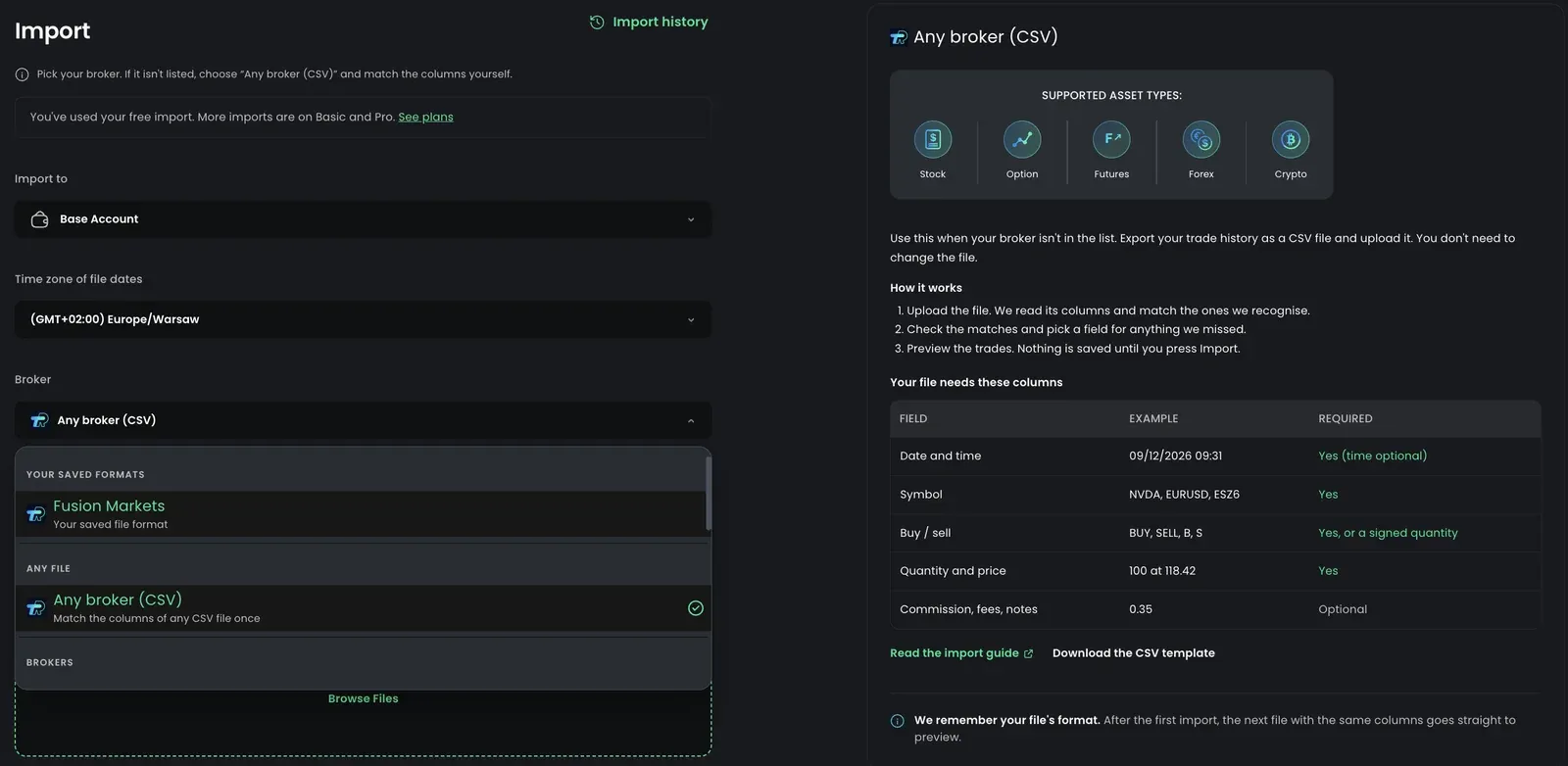
If your broker isn’t in the broker list, you can still import its trade history. Export a CSV file from your broker, upload it as it is, and tell us once which column is the date, the symbol, the side and so on. We remember that for next time.
How it works
Section titled “How it works”- Upload. Pick the trading account, choose Any broker (CSV) in the broker list, and upload the file. You don’t need to edit it first.
- Match columns. We read the column names and match the ones we recognise. You check the matches and pick a field for anything we missed.
- Preview. You see every trade we found before anything is saved. Nothing is imported until you press Import.
- Done. Your format is saved, so the next file with the same columns goes straight to the preview.
Export a CSV from your broker
Section titled “Export a CSV from your broker”Look for a page called History, Activity, Orders, Statements or Reports in your broker’s website or desktop platform, and export it as CSV. A few tips:
- Export executions, fills or orders, not account balances or positions.
- Pick a date range that covers the trades you want. Overlapping an earlier import is fine: trades already in your journal are skipped.
- One import takes up to 10,000 rows (and files up to 20 MB). For a longer history, export it in parts, for example a quarter or a year at a time, and import each file.
- If you can choose between CSV and Excel, choose CSV. If your broker only offers Excel (
.xlsx), open it and save it as CSV.
Some brokers have their own import with step-by-step instructions, for example Webull, Interactive Brokers and Tradovate. Use those when your broker is listed.
Match your columns
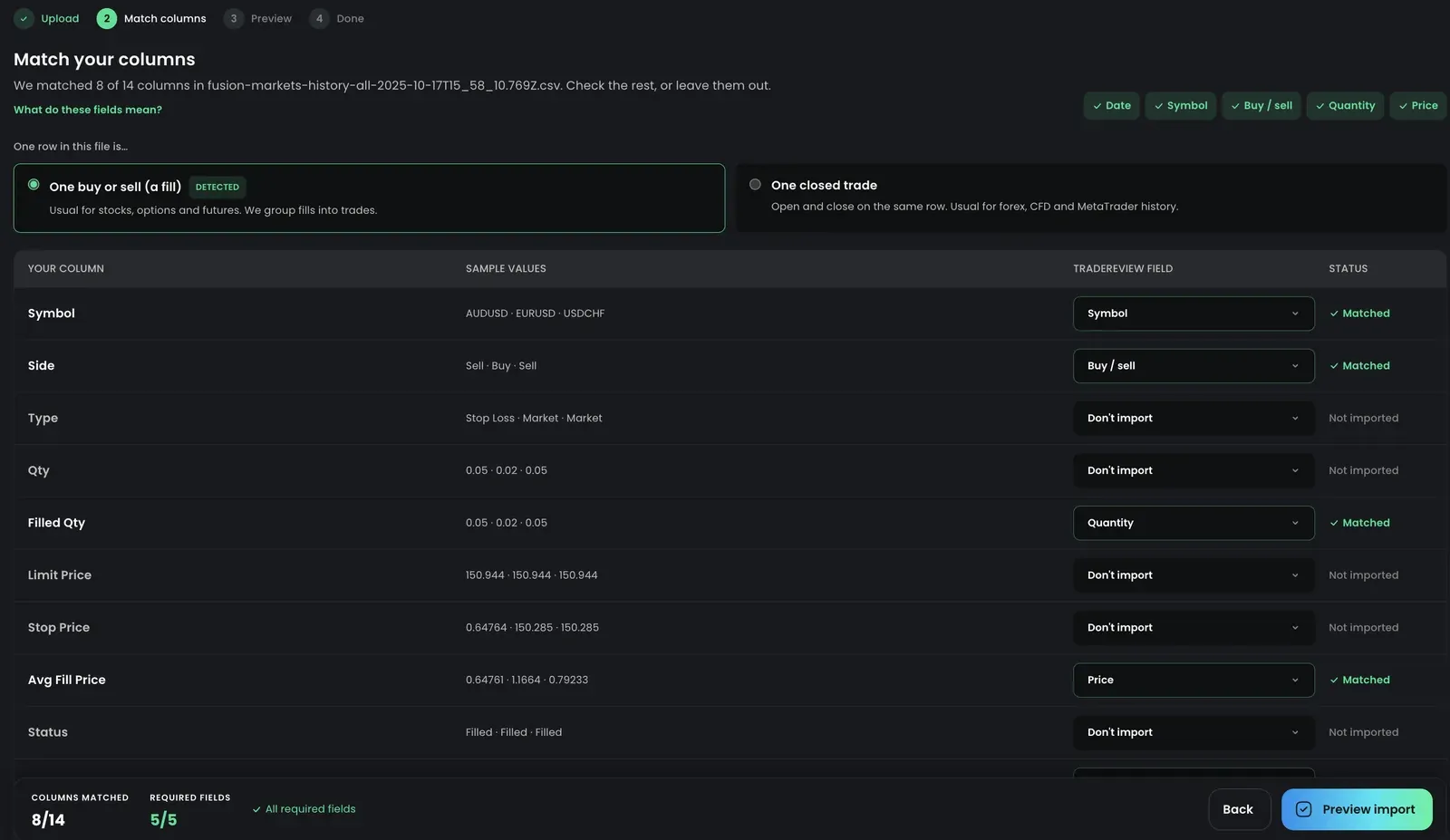
Section titled “Match your columns”Each column in your file is shown with a few sample values. Choose the TradeReview field it holds, or leave it as Don’t import. Columns we matched automatically are marked green; columns you changed are marked blue.
What each field means
Section titled “What each field means”| Field | Required | What it holds | Examples |
|---|---|---|---|
| Date | Yes | The day of the fill. Use Date and time if one column holds both. | 09/12/2026, 2026-09-12 |
| Time | No | Time of the fill. Without it, fills on the same day are ordered as they appear in the file. | 09:31:04 |
| Symbol | Yes | The ticker or contract. | NVDA, EURUSD, ESZ6 |
| Buy / sell | Yes* | The side of the fill. You choose what each word means in the next step. | BUY, SELL, B, S |
| Quantity | Yes | Shares, contracts or lots. | 100, -50 |
| Price | Yes | Fill price. | 118.42 |
| Commission, Fees | No | Costs per fill. Both are added to the trade’s fees. | 0.35 |
| Profit | No, but match it for lots | The broker’s profit, usually on the fill that closes the position. If your volume is in lots (forex, CFDs) or the file is futures, it sets each closed trade’s contract size so P&L matches your broker. | 397.00 |
| Execution ID | No | A unique ID per fill, often called Order ID or Trade ID. Strongly recommended: it is how we recognise trades you already imported. | A9F2-118 |
| Type | No | Asset type of the row. Without it, the file uses the asset type you pick on the Match columns step; option symbols like AAPL260918C00230000 are recognised either way. | Stock, Option, Futures |
| Notes | No | Free text copied to the trade’s notes. |
*Not needed when sells have a negative quantity, such as -50.
If a required field is missing, Preview import stays disabled and the missing fields are listed at the bottom of the page.
One row: a fill or a closed trade
Section titled “One row: a fill or a closed trade”Tell us what one row in your file is. We pre-select the one that looks right and mark it Detected.
- One buy or sell (a fill). Usual for stocks, options and futures. We group fills into trades: a buy of 100 and two sells of 60 and 40 become one trade.
- One closed trade. The open and the close are on the same row. Usual for forex, CFD and MetaTrader history. Instead of Date and Price, match these columns:
| Field | Required | What it holds | Examples |
|---|---|---|---|
| Open time | Yes | When the trade was opened, with the time. | 2026.09.12 09:31:04 |
| Open price | Yes | Entry price. | 1.16300 |
| Close time | No | When the trade was closed. | 2026.09.12 11:02:00 |
| Close price | No | Exit price. | 1.16550 |
| Profit | No, but match it for lots | The broker’s profit for the trade, before swap and commission. Volume in lots isn’t a number of units (one lot of XAUUSD is 100 oz), so we use the profit to work out each trade’s contract size and match the broker’s P&L. | 397.00, -73.20 |
Buy / sell says whether the trade is long (opened with a buy) or short (opened with a sell). A row without a close time or close price is imported as an open trade. Commission and fees are counted once per trade. Columns such as S/L, T/P or Swap can be left as Don’t import. If your volume is in lots (forex, CFDs, indices), match Profit: without it, P&L is worked out as price change × volume, which is right for shares but not for lots.
Buy and sell words
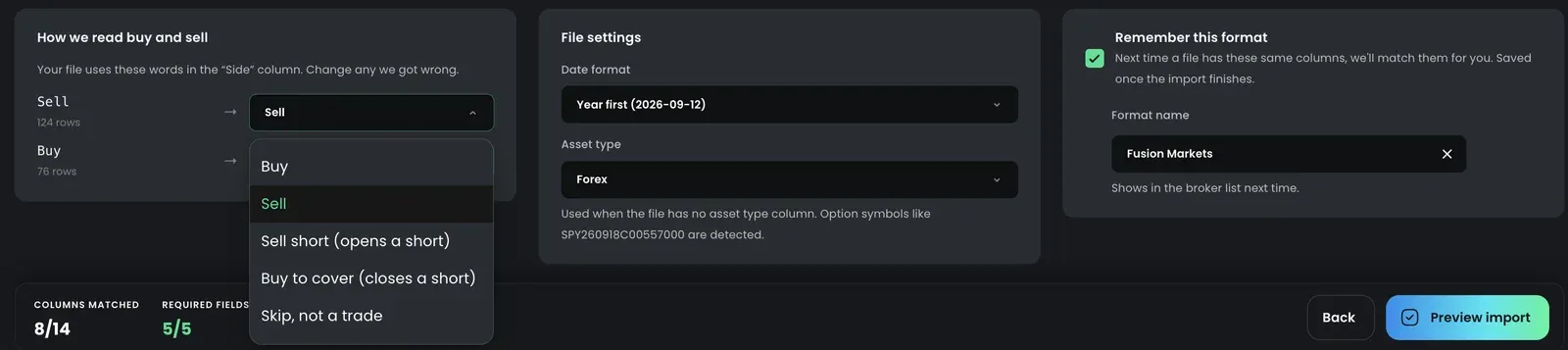
Section titled “Buy and sell words”Brokers write the side in different ways. For each word found in your Buy / sell column, choose what it means:
- Buy and Sell for regular long trades.
- Sell short opens a short; Buy to cover closes it.
- Skip for rows that aren’t trades, such as dividends, interest or transfers. Skipped rows are listed in the preview.
Check the preview
Section titled “Check the preview”The preview shows how many trades are new, how many are already in your journal, and how many are still open. Select a count to filter the list, and open any trade to see the fills it was built from and the row numbers in your file.
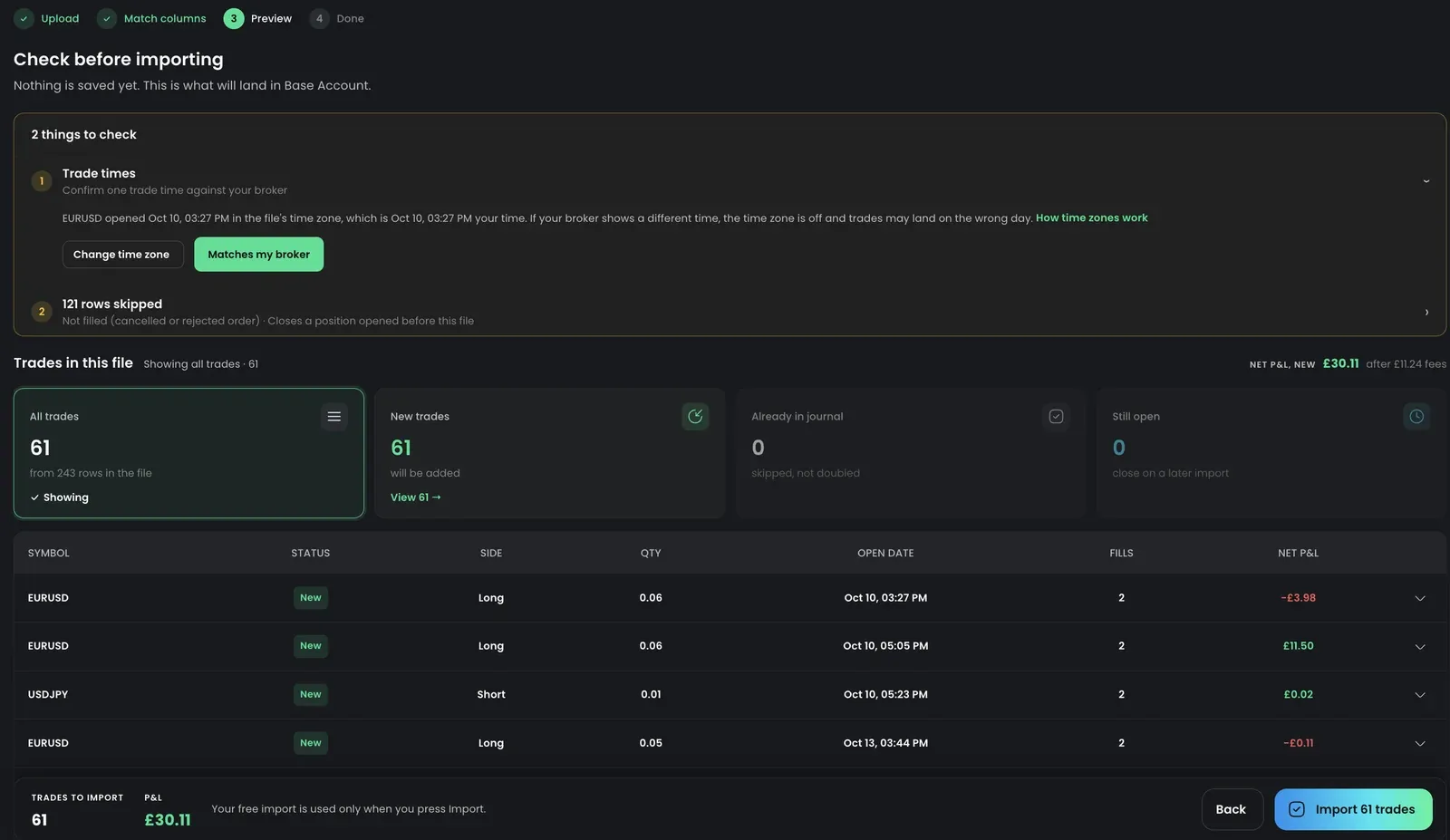
Before importing, we may ask you to check a couple of things.
Date formats
Section titled “Date formats”03/04/2026 is March 4 in the US and 3 April in most other places. If most rows can’t be read, the dates are probably in a different order from the one selected. The preview offers to switch the format (for example from MM/DD/YYYY to DD/MM/YYYY) and updates right away. You can also change it on the Match columns step.
Time zones
Section titled “Time zones”Broker files usually don’t say which time zone their times are in. Pick the time zone in the upload step, then compare one trade in the preview with your broker. If the time doesn’t match, change the time zone, otherwise trades near midnight can land on the wrong day in your calendar and reports.
Skipped rows
Section titled “Skipped rows”Rows are skipped when they can’t become part of a trade: an unreadable date or price, a row marked Skip (such as a dividend), or a repeated Execution ID. Order histories also list orders that were never filled (cancelled or rejected, with no fill price); these are skipped as Not filled. A closing row for a position you opened before the file’s date range is skipped too, since the file has no opening row to pair it with. Export a range that starts before that position was opened to include it. The preview lists each reason with the row number. Download skipped rows (CSV) gives you just those rows, as they are in your file, with the row number and the reason. Fix them and import them again: rows that were already imported won’t be doubled.
Trades already in your journal
Section titled “Trades already in your journal”If a trade is already in the account (same Execution ID, or the same symbol, side, quantity, price and time), it’s left as it is and not imported again. This makes it safe to import overlapping date ranges, for example a full month after a mid-month import.
If the file has more fills for a trade that’s already there, usually the close of a position you imported while it was still open, the preview marks it Adds fills. Importing adds the new fills to that trade instead of creating a second one.
Open trades
Section titled “Open trades”A buy with no matching sell in the file is imported as an open trade. It closes automatically when you import a later file that contains the closing fill.
Large files
Section titled “Large files”A file with thousands of trades takes a minute or two to import, and the page shows how it’s going. Keep the page open until it finishes. If you try to go to another page while an import or an undo is running, we ask first. Leaving doesn’t stop it, but for an import you won’t see the summary.
Saved file formats
Section titled “Saved file formats”A format remembers which column is which field, what each buy/sell word means, the date format and the time zone. Tick Remember this format on the Match columns step and give it a name. The format is saved when the import finishes.
- Next time: when you upload a file with the same columns, we recognise the format and go straight to the preview. Your saved formats also appear at the top of the broker list.
- Changed columns: if you change a column while using a saved format, choose whether to update the format, save it as a new one, or use the change only for this import.
- Two accounts at one broker: save a format for each with different names if their files differ.
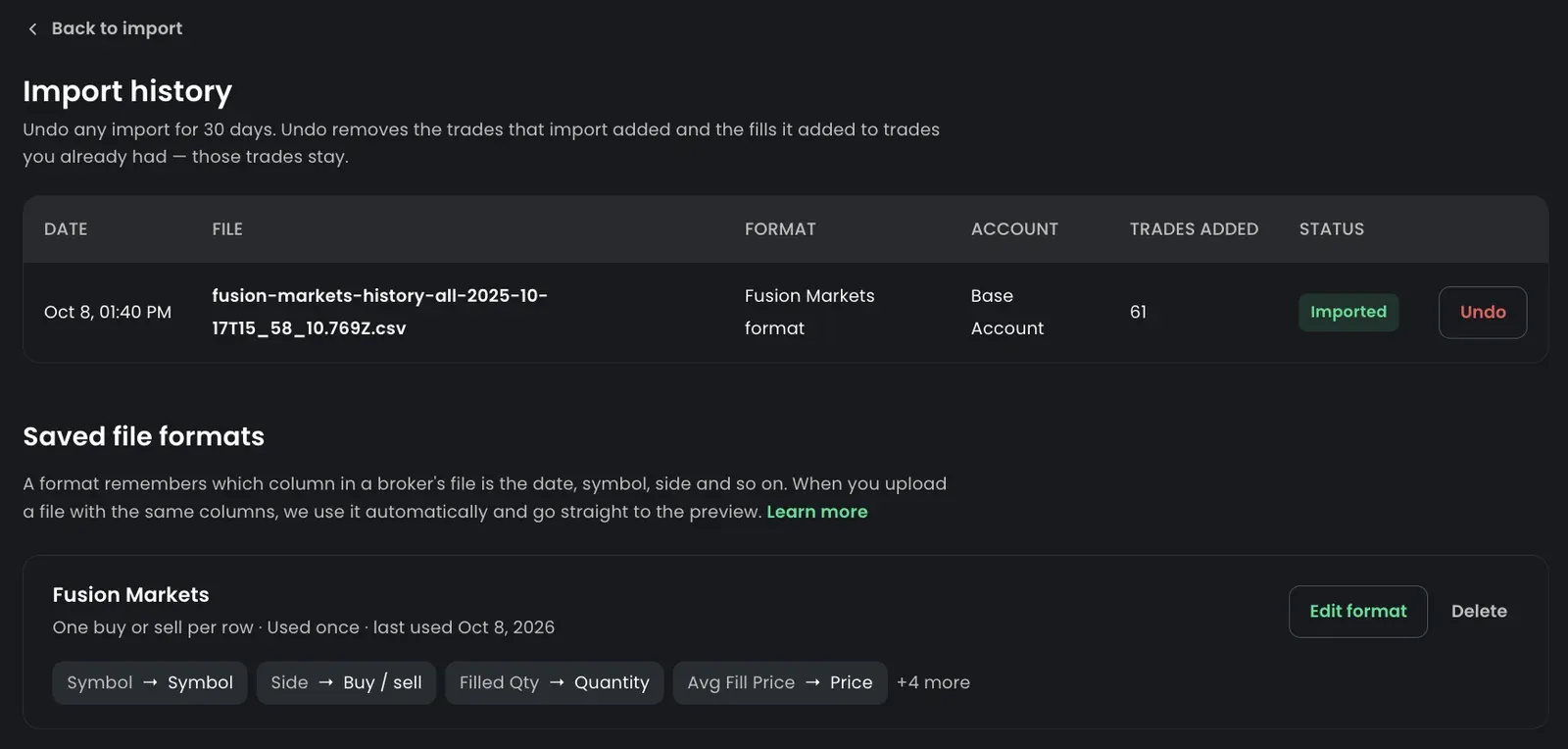
- Change a format without a file: pick Manage saved formats at the end of the Broker list on the Import page (or Edit format after an import). You can rename the format, change the date format and time zone, pick a different field for any column and change what each buy/sell word means. Examples from the last file you imported help you check each column. Changes apply to future imports only. Trades you already imported don’t change.
- Change a format with a file: upload the file, press Check columns, make your changes and pick Update the format when you import.
- Delete a format: in Manage saved formats, press Delete. Your imported trades stay. The next file from that broker will need its columns matched again.
Undo an import
Section titled “Undo an import”Imported the wrong file, or into the wrong account? You can undo any file import for 30 days.
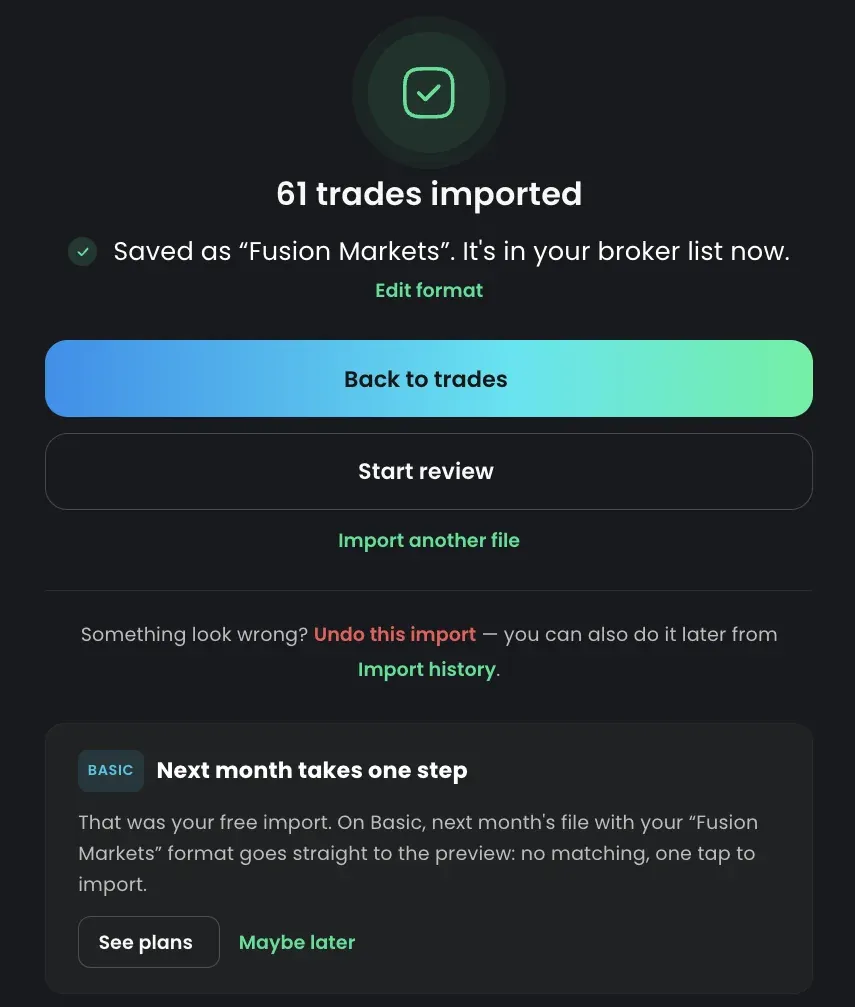
- Right after importing: press Undo this import on the summary screen.
- Later: open Import history on the Import page. It lists your file imports with the file, format, account and how many trades each one added. Press Undo next to an import.
Undo removes the trades that import added. Trades that were already in your journal stay, but if the import added fills to them (for example the close of a position you imported while it was still open), undo takes those fills out again, so the trade is back to the fills it had before. Your saved file format stays too.
Before anything is removed, we show how many trades and added fills will go. If you’ve added tags, a strategy, screenshots or a review to some of them since the import, we say so: those go with the trades.
After 30 days an import can no longer be undone from the history. You can still delete its trades on the Trades page.
Use the TradeReview CSV template
Section titled “Use the TradeReview CSV template”If you build the file yourself, for example from a spreadsheet, start from our template: download TradeReview.csv. Its columns are matched automatically:
- Date, Time
- Symbol
- Type (stock or option)
- Price
- Quantity (add
-for a sell) - Commission, Fee, Tags, Notes (optional)
Only Date, Time, Symbol, Type, Price and Quantity are needed, so you can leave out the columns you don’t use. Column names can be in upper or lower case, and spaces around them don’t matter.
You can also upload this file with TradeReview chosen in the broker list. If a needed column is missing, the upload step says which one before anything is sent.
Option symbols use the OCC format, for example YHOO150416C00030000:
| Component | Value | Location in symbol |
|---|---|---|
| Root symbol | YHOO | YHOO150416C00030000 |
| Expiration year | 2015 | YHOO150416C00030000 |
| Expiration month | 04 | YHOO150416C00030000 |
| Expiration day | 16 | YHOO150416C00030000 |
| Call or put | Call | YHOO150416C00030000 |
| Strike price* | $30.00 | YHOO150416C00030000 |
*The decimal point falls 3 places from the right: 00030000 is 30.000.
If a file doesn’t match your broker
Section titled “If a file doesn’t match your broker”When you choose a broker from the list, the file has to be that broker’s export. If it isn’t, for example a different report or a file from another broker, the Import page shows a message with the columns that are missing. The message stays until you change the file or the broker. Either export the report described in your broker’s guide, or choose Any broker (CSV) and match the columns yourself: Use Any broker (CSV) in the message switches to it and keeps your file.
Need help?
Section titled “Need help?”If your file won’t import, send us an example through Featurebase or Discord. We can also add a built-in import for your broker.